


OBD2 OBD-II Car Auto Diagnostic Scan Tools


This is the one that I bought: Robot Check. It works great. It is WiFi, though, since the Bluetooth versions don't work with my previous iPhone 5 or my current 6+. Dash Command is free and is a great app. I use it to read the codes on friends and family's cars too. It is real time but there is a small delay. Noticeable but not frustrating. The only bad thing about this version is that when you are connected to it, you don't get internet. It's basically a tiny wireless router (with only one connection versus multiple) and your phone has no way of knowing that the router it's connected to isn't connected to the internet. So, you probably don't want to use this while commuting but it works well for diagnostics and would probably work well at the track.
It's supposed to work the same way with a laptop but I don't know of any programs that you can install on the laptop to read the device. There's got to be something out there but who knows if it's free or not. That and you still have the same problem as above. No internet while connected to it. Unless you install a cellular data antennae and pull your internet from that.
It's supposed to work the same way with a laptop but I don't know of any programs that you can install on the laptop to read the device. There's got to be something out there but who knows if it's free or not. That and you still have the same problem as above. No internet while connected to it. Unless you install a cellular data antennae and pull your internet from that.

Registered User
Joined: Oct 2014
Posts: 1,047
Likes: 104
From: Charlotte NC (sorta)

Hmmmm, maybe I'll stick with this $70 unit. They claim to have the most reports per second.
Amazon.com: ScanTool 427201 OBDLink LX Bluetooth: OBD Adapter/Diagnostic Scanner for Android & Windows: Automotive
Amazon.com: ScanTool 427201 OBDLink LX Bluetooth: OBD Adapter/Diagnostic Scanner for Android & Windows: Automotive

Registered User
Joined: Feb 2014
Posts: 29
Likes: 1
It wasn't necessary for my needs but I can see paying more for a unit that has faster communication for sure. I wonder what the difference in throughput is between Bluetooth and WiFi. More than likely, the WiFi models are using B and not N. And there could be other factors involved (like processor speed between models/version/brands). All things are not equal, that's for sure. Too many variables involved.
https://www.scantool.net/forum/index.php?topic=10032.0
I have the MX Bluetooth version. I opted for it over various knockoffs to get consistent performance and to avoid battery drain. It works well with my Moto X Android phone, no issue with leaving it plugged in the car.
Registered User
Joined: Oct 2014
Posts: 1,047
Likes: 104
From: Charlotte NC (sorta)
According to Scantool.net the throughput is the same for the Bluetooth and Wi-Fi versions:
https://www.scantool.net/forum/index.php?topic=10032.0
I have the MX Bluetooth version. I opted for it over various knockoffs to get consistent performance and to avoid battery drain. It works well with my Moto X Android phone, no issue with leaving it plugged in the car.
https://www.scantool.net/forum/index.php?topic=10032.0
I have the MX Bluetooth version. I opted for it over various knockoffs to get consistent performance and to avoid battery drain. It works well with my Moto X Android phone, no issue with leaving it plugged in the car.
Registered User
Joined: Oct 2014
Posts: 1,047
Likes: 104
From: Charlotte NC (sorta)


Registered User
Joined: Jan 2012
Posts: 452
Likes: 30
From: Southlake, TX
Registered User
Joined: Oct 2014
Posts: 1,047
Likes: 104
From: Charlotte NC (sorta)
So far, I've purchased DashCommand from the Play store ($9.95). It seemed to do a better job than the OBDLink software in terms of calculations.
For example, I can't get an AF ratio in OBDLink, but I can in DashCommand. From what I can tell, OBDLink is more likely to just give me raw signal for the most part. DashCommand takes that raw signal, does some math to it, and gives me things like HP, Torque, and AF Ratio.
I do really like how customizable the dials look in OBDLink though.
For example, I can't get an AF ratio in OBDLink, but I can in DashCommand. From what I can tell, OBDLink is more likely to just give me raw signal for the most part. DashCommand takes that raw signal, does some math to it, and gives me things like HP, Torque, and AF Ratio.
I do really like how customizable the dials look in OBDLink though.

Thread Starter
Premier Member


Joined: Dec 2012
Posts: 773
Likes: 50
From: Ontario canada
Do all these provide Live Data, or do I have to read the description closely? I don't want something that just reads a code, I want more from it.
At Advance Auto, the cheapest OBD II scanner that have a live feed is $99, and if I want to read ABS codes, it's $250.
Will any of these give me live info as well as ABS codes?
I am most interested in this one:
Amazon.com: BAFX Products - Bluetooth OBD2 scan tool - For check engine light & diagnostics - Android ONLY: Automotive
Or this one:
Amazon.com: ScanTool 427201 OBDLink LX Bluetooth: OBD Adapter/Diagnostic Scanner for Android & Windows: Automotive
I know it's quite a price difference, but will either of them give me both live info as well as ABS codes?
At Advance Auto, the cheapest OBD II scanner that have a live feed is $99, and if I want to read ABS codes, it's $250.
Will any of these give me live info as well as ABS codes?
I am most interested in this one:
Amazon.com: BAFX Products - Bluetooth OBD2 scan tool - For check engine light & diagnostics - Android ONLY: Automotive
Or this one:
Amazon.com: ScanTool 427201 OBDLink LX Bluetooth: OBD Adapter/Diagnostic Scanner for Android & Windows: Automotive
I know it's quite a price difference, but will either of them give me both live info as well as ABS codes?
I don't think those can read the ABS sensor?
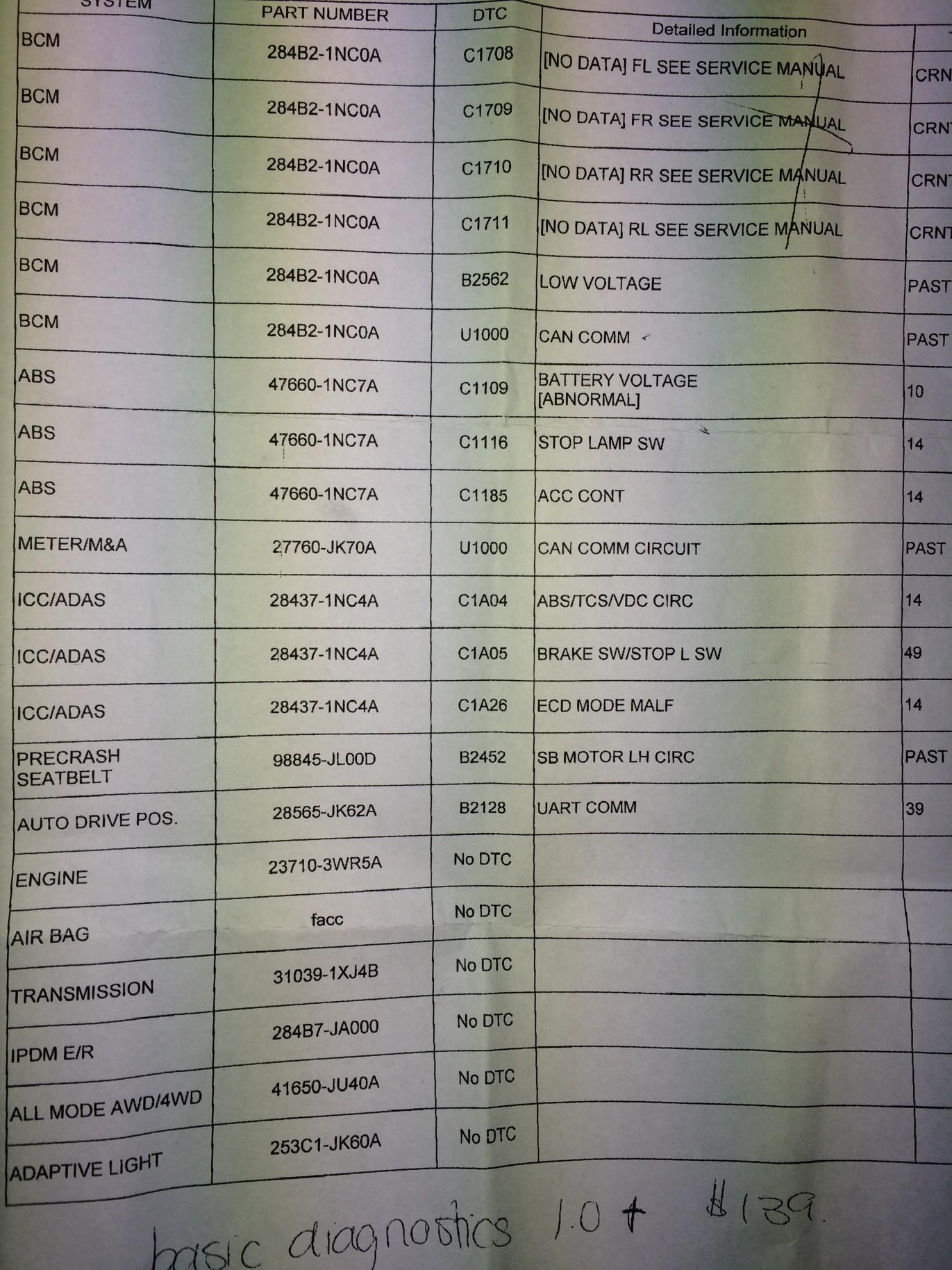
I bought the OBDII for the iPhone and It never showed anything, I went to the dealer this morning for the ABS/VDC light on and they told me that all those code were showing lol

Thread
Thread Starter
Forum
Replies
Last Post
Chris Olson
Audio, Video & Electronics
17
Dec 29, 2025 07:59 PM


