G37 Sedan

Carputer install

Thread Tools
 
Search this Thread
 
Old Sep 8, 2011 | 06:46 PM
  #1  
bluestacy04's Avatar
bluestacy04
Thread Starter
Registered User
iTrader: (1)
 
Joined: Aug 2006
Posts: 18
Likes: 0
Carputer install

Figured I would share some love with you guys since Im normally on driver. Let me know what you guys think!

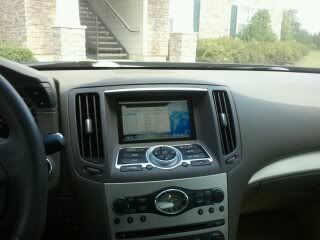
So for a few weeks I have been working on a carputer setup for the car. Finally after everything came in and some parts got installed today its all up and running. Still need to work on the resoluton stuff, but it is working extremely well! Let me know what you guys think! Sorry ahead of time for the phone pics. I will get some nice ones done soon. Screen quality is much better than it looks.

Details on System:
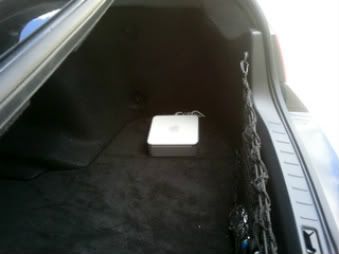
Mac Mini (flame suit ready)
Running OSX and Windows 7
Carnetix 2140 power supply

Soon enough I'm going to put Orisis on it too so I can monitor the car too.

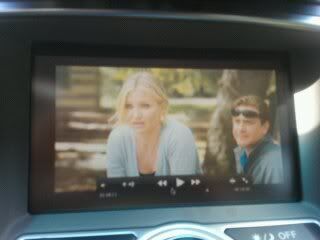
Bad Teacher
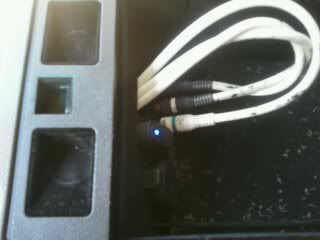
Still need to clean up a bit.
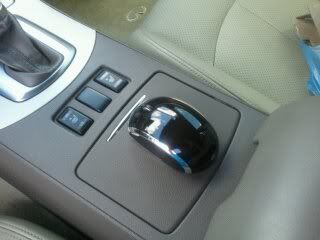
Where the mini will sit.


Ofcourse to match the car!
Reply
Old Sep 8, 2011 | 06:59 PM
  #2  
Kuro's Avatar
Kuro
Registered Member
iTrader: (80)
 
Joined: Mar 2011
Posts: 3,851
Likes: 184
From: West Palm Beach, FL
That's cool.
Reply
Old Sep 8, 2011 | 07:54 PM
  #3  
kaoticdemize's Avatar
kaoticdemize
Registered User
iTrader: (2)
 
Joined: Apr 2010
Posts: 1,442
Likes: 36
I like. Just please do not be watching a movie like bad teacher when you run off the road and kill a bunch of people make it worth while like 300 or something
Reply
Old Sep 8, 2011 | 08:49 PM
  #4  
bluestacy04's Avatar
bluestacy04
Thread Starter
Registered User
iTrader: (1)
 
Joined: Aug 2006
Posts: 18
Likes: 0
Originally Posted by kaoticdemize
I like. Just please do not be watching a movie like bad teacher when you run off the road and kill a bunch of people make it worth while like 300 or something
LOL... Honestly its nice to have access to all my music for once. My Ipod just cant handle it all.
Reply
Old Sep 8, 2011 | 10:16 PM
  #5  
1BadAssG's Avatar
1BadAssG
Registered User
 
Joined: Oct 2010
Posts: 439
Likes: 1
From: Las Vegas
Nice setup but not digging the mouse. You should get the ones where it is flushed in the middle of seat heaters. I've seen another member having it and it looks very nice.
Reply
Old Sep 8, 2011 | 11:47 PM
  #6  
DadsTaxi's Avatar
DadsTaxi
Registered User
 
Joined: Jul 2011
Posts: 95
Likes: 0
From: AZ
Originally Posted by bashirdur
Nice setup but not digging the mouse. You should get the ones where it is flushed in the middle of seat heaters. I've seen another member having it and it looks very nice.
Of course you could go with one of the Apple Trackpads. They work great. Not sure if there would be any Bluetooth interference having to separate systems though. But definitely looks nice.
Reply
Old Sep 9, 2011 | 10:13 AM
  #7  
Rickblkg's Avatar
Rickblkg
Registered User
 
Joined: Jul 2011
Posts: 320
Likes: 0
Awesome mod blue, looks like the mod bug has hit you hard !
Reply
Old Sep 9, 2011 | 10:21 AM
  #8  
james0076ss's Avatar
james0076ss
Registered Member
iTrader: (1)
 
Joined: Jan 2006
Posts: 179
Likes: 1
From: Cali, SGV
Very Cool! BTW, how did you tap power for the MacMini or did you use a power invertor?
Reply
Old Sep 10, 2011 | 08:59 PM
  #9  
bluestacy04's Avatar
bluestacy04
Thread Starter
Registered User
iTrader: (1)
 
Joined: Aug 2006
Posts: 18
Likes: 0
Originally Posted by Rickblkg
Awesome mod blue, looks like the mod bug has hit you hard !
Heck yeah it has!
Reply
Old Sep 10, 2011 | 09:00 PM
  #10  
bluestacy04's Avatar
bluestacy04
Thread Starter
Registered User
iTrader: (1)
 
Joined: Aug 2006
Posts: 18
Likes: 0
Originally Posted by james0076ss
Very Cool! BTW, how did you tap power for the MacMini or did you use a power invertor?
Thanks Man!! It was powered by a Carnetix 2140. It takes the 12 volts from the battery and converts it to 18.5 volts for the Mac.
Reply
Old Sep 10, 2011 | 09:54 PM
  #11  
AllentownG37's Avatar
AllentownG37
Registered User
 
Joined: Jun 2011
Posts: 317
Likes: 2
From: Allentown, PA
Originally Posted by DadsTaxi
Of course you could go with one of the Apple Trackpads. They work great.
Second this, or go with one of those Griffin PowerMates. Either way, glad to see a Mac in a G.
Reply
Old Sep 10, 2011 | 10:29 PM
  #12  
Rickblkg's Avatar
Rickblkg
Registered User
 
Joined: Jul 2011
Posts: 320
Likes: 0
Blue do you have navi in your car? Because I was wondering if you can install some type of Navi software to work with the cars screen? Anyone try this yet?
Reply
Old Sep 11, 2011 | 11:48 AM
  #13  
bluestacy04's Avatar
bluestacy04
Thread Starter
Registered User
iTrader: (1)
 
Joined: Aug 2006
Posts: 18
Likes: 0
Originally Posted by Rickblkg
Blue do you have navi in your car? Because I was wondering if you can install some type of Navi software to work with the cars screen? Anyone try this yet?
Nope no Nav in it from the factory. I'm trying out some different Nav software this week though. Also installing an in car camera.
Reply
Old Sep 11, 2011 | 11:49 AM
  #14  
bluestacy04's Avatar
bluestacy04
Thread Starter
Registered User
iTrader: (1)
 
Joined: Aug 2006
Posts: 18
Likes: 0
Originally Posted by AllentownG37
Second this, or go with one of those Griffin PowerMates. Either way, glad to see a Mac in a G.
Thanks. Yeah I've been looking at one of the powermates.
Reply
Old Sep 11, 2011 | 02:29 PM
  #15  
Rickblkg's Avatar
Rickblkg
Registered User
 
Joined: Jul 2011
Posts: 320
Likes: 0
Cool, if you find a good software I might have to do this as well .....
Reply


All times are GMT -4. The time now is 09:41 PM.