


Review Mob Armor MobNetic Maxx and FLEX Magnetic Charger


Mob Armor MobNetic Maxx and FLEX Magnetic Charger
For years I have been on the on-and-off quest to find a suitable phone mount, preferrably with a wireless charger function. This entire review is in the context of the G37 Sedan. I'm not too familiar with the nuances of the coupe interior.
My requirements were that the phone must still function with Qi charging on any Qi charger I use -- not just the one for the car mount. It must not substantially block any of the controls for the radio/climate or the screen. I also didn't want to mount it on the windshield because I already have the Garmin DriveSmart 65 there and don't like that it uses a suction cup. It's ugly, not too stable and doesn't bring the device close enough. I also initially had the requirement it doesn't block the vents. I live in Arkansas and it gets pretty HOT. I ended up trying out a few mounts that block a vent along my journey just because there was a serious lack of an adequate option.
What I tried PRIOR to the Mob Armor system:
I believe the first one I started with was the ProClip (parts 854022 and 216069). This was a mount made specifically for the car and mounted to the right of the passenger climate control pot. They have another one that goes near the shifter column, but it isn't compatible with the G trims with the chrome bars on each side. Mine is one of those as it is a "Journey with Sport Appearance Package".
Images:
This one was fine, until the adhesive on the foam pad on the left side starting wearing off. I tried glueing it with superglue, a few times, and it never really fixed it. There are indentations on the plastic arms behind the foam so there's not much there in terms of contact surface to glue to the foam.
Eventually I obtained a different phone holder which is setup in a way where you slide the phone into a cradle. That worked fine, for a while. Then I had someone riding passenger and they kneed it (not even that hard) and it messed it up. I added some of that grey, double-sided tape in there but it was never the same as far as stability. Then, I had to make sure to remind friends not to knee my mount, which was annoying on it's own. They ended up doing it anyway and it was again very unstable.
Because of this issue, I tried various options on Amazon. I won't go over all the various cheap Amazon things I tried but long story short I returned them all becasue they are either falsely advertised or don't work well with the G. Sometimes the problem was the S21 Ultra is too heavy and/or large and it bobbles/falls/rotates. Other times they claim they work with Qi charging but don't. I tried at least 8 different systems from Amazon and all of them were returned.
I will go over some of the more "big name" options I tried. One of them was the Panavise system, which was similar to the ProClip. That one seemed promising but when removing the phone from the tension phone mount, it bent the steel on the Panavise. That's useless. Another "big name" option was a RAM mount. It was very finicky trying to get this on and off the phone due to the button placements on my phone and the method of which you must operate the mount. I was willing to put up with that and give it a try, after having tried so many from Amazon (I forgot to mention that I also tried probably 3-5 options from local stores like Best Buy or Target). The RAM mount I chose was the kind that attaches to the seat rail on the passenger side. The problem is the G37 Sedan's seat rail has these "fins" that come up perpendicular to the floor of the vehicle and the RAM mount was too wide to fit between those fins.
My requirements were that the phone must still function with Qi charging on any Qi charger I use -- not just the one for the car mount. It must not substantially block any of the controls for the radio/climate or the screen. I also didn't want to mount it on the windshield because I already have the Garmin DriveSmart 65 there and don't like that it uses a suction cup. It's ugly, not too stable and doesn't bring the device close enough. I also initially had the requirement it doesn't block the vents. I live in Arkansas and it gets pretty HOT. I ended up trying out a few mounts that block a vent along my journey just because there was a serious lack of an adequate option.
What I tried PRIOR to the Mob Armor system:
I believe the first one I started with was the ProClip (parts 854022 and 216069). This was a mount made specifically for the car and mounted to the right of the passenger climate control pot. They have another one that goes near the shifter column, but it isn't compatible with the G trims with the chrome bars on each side. Mine is one of those as it is a "Journey with Sport Appearance Package".
Images:
Spoiler


This one was fine, until the adhesive on the foam pad on the left side starting wearing off. I tried glueing it with superglue, a few times, and it never really fixed it. There are indentations on the plastic arms behind the foam so there's not much there in terms of contact surface to glue to the foam.
Eventually I obtained a different phone holder which is setup in a way where you slide the phone into a cradle. That worked fine, for a while. Then I had someone riding passenger and they kneed it (not even that hard) and it messed it up. I added some of that grey, double-sided tape in there but it was never the same as far as stability. Then, I had to make sure to remind friends not to knee my mount, which was annoying on it's own. They ended up doing it anyway and it was again very unstable.
Because of this issue, I tried various options on Amazon. I won't go over all the various cheap Amazon things I tried but long story short I returned them all becasue they are either falsely advertised or don't work well with the G. Sometimes the problem was the S21 Ultra is too heavy and/or large and it bobbles/falls/rotates. Other times they claim they work with Qi charging but don't. I tried at least 8 different systems from Amazon and all of them were returned.
I will go over some of the more "big name" options I tried. One of them was the Panavise system, which was similar to the ProClip. That one seemed promising but when removing the phone from the tension phone mount, it bent the steel on the Panavise. That's useless. Another "big name" option was a RAM mount. It was very finicky trying to get this on and off the phone due to the button placements on my phone and the method of which you must operate the mount. I was willing to put up with that and give it a try, after having tried so many from Amazon (I forgot to mention that I also tried probably 3-5 options from local stores like Best Buy or Target). The RAM mount I chose was the kind that attaches to the seat rail on the passenger side. The problem is the G37 Sedan's seat rail has these "fins" that come up perpendicular to the floor of the vehicle and the RAM mount was too wide to fit between those fins.
Last edited by AnotherVQ; Sep 11, 2022 at 12:06 AM.
Mob Armor review:
So as I continued to search for solutions which allow for Qi charging in the car (and being willing to settle for any kind of mount thats works), I ended up coming across the Mob Armor FLEX wireless charger video on the Mob Armor website. It showed how it was made to work with Qi charging and their magnetic mounting system. I researched it a little and there wasn't much information available on websites or in YouTube videos, but I decided to give it a shot. I ordered my FLEX charger ($50) and Mobnetic Maxx mount ($47) on August 30th, 2022.
When I received the items I was very impressed with the quality. This hasn't been the first time but usually it was because the quality seemed higher than I expected for the price. These are probably considerd mid-range for mounts in general, in terms of price. However, for a magnetic mount, the $47 price tag is probably a little high compared to the other ones available. There were pros and cons to the experience and I'm going to outline those now.
Right from the start I was hith a minor "con", which is that the QR link included with the MobNetic Maxx wasn't resolvable. It is possible it was a DNS error on my (Cloudflare's) side or somewhere along the route but I have a feeling it was the shortened link service they used. Not a big deal though, as it's pretty self-explanatory. I was just curious because I was so impressed so far with the company's product at this point.
The mount comes with 2 very thin, adhesive-backed steel plates, shaped in the Mod Armor logo shape with "M/A" branding on them. These are intended to be placed away from the charging coil area of the phone so you can mount it by the thin steel plates and still use Qi charging. One of the chargers from Scosche which I tried at Best Buy had a similar mechanism. I won't be using those so I ignored them. It also comes with two, relatively thicker (than the steel plates) steel discs, also with adhesive backing. They are sized just slightly larger than the soft magnetic surface of the mount on each side. The mount has a 90 degree pivoting head which allows you to have the mount straight out or anywhere in-between straight out and a 90 degree angle. It stays put once you set it because there's apparently as spring inside, pushing against the ball.
I tried figuring out where the phone would set once the mount was attached, to the best of my ability, but it was tough. The reason for this is the strength of the magnetization. As you will find out, it was well worth the effort. I managed to figure out where I wanted to mount it and prepped the surface well then attached the disc. I allowed I believe 32 hours of curing time (instructions state 24 hours, but I was busy).
Before attaching the FLEX charger to the back of my case, I decided to order a thinner version of the Spigen case I have because I realized this thing would block the kickstand on my old case. I decided I didn't want to have a case with a useless kickstand so I would go for a different case to put this on incase I wanted to go back to the kickstand case in the future, for some reason. The funny thing is the thinner case I bought, which has a more smooth back than my kickstand case, has a camera bump, making it a little hard to attach the FLEX charger. The adhesive for the FLEX charger is very good, though and it's only a small part of the phone where it overlaps the camera bump. I used the included plastic sheet for alignment of the FLEX charger, but none of the lines perfectly aligned with the S21 Ultra, even with the very thin case I have. The directions on the plastic guide thing seemed incorrect or something because you can't pull the middle tab when the charger is over the plastic. I just decided to pull that a different way and position the mount, then follow the directions from there (it's hard to explain, but once you have one you'll see). I tried to position it roughly in the center and kept in mind that in the video they showed, it does overlap the camera cutout area a little bit. Turns out I must have nailed it, because it works fine (for the most part, as I did notice that when the phone is at 100%, my desktop Anker Qi charger blinks as if it's having trouble Qi charging. That is the behavior the charger exhibits when something magnetic is in the way of the coils or it can't connect for charging for some other reason. I don't consider this to be a big deal, though and it's worth the pros of the setup).
Moving on to the actual use of the FLEX charger in the car, it works great. It connects just fine every time and utilizes fast wireless charging on my phone. I did decide to buy their car adapter because the FLEX charger uses Type C and the one I already had for my car had two Type A ports and didn't have the wattage required for the fast wireless charging. I do need a type A on this adapter as I decided to connect by dashcam there, so I paid the $25 for the Mob Armor 38w dual USB Quick-Charge adapter. I am happy to report that it's small enough to fit in that tiny cut-out on the G37 sedan, where some other ones had trouble physically fitting into that area. Another pro of this charger is the simplicity of attaching and removing the phone.
Now onto another con of this system. The adhesive backing started coming off after only a few uses! The mount was hanging off the dash when the phone was on. I only had my phone for a camera so I decided to pull on it a bit with my finger to demonstrate how far away from the dash it was when the phone was on the mount. See below...
Images:
I contacted Mob Armor on September 6th at night and I'm writing this review at night on the 10th and they still haven't replied. That's 3 business days and a saturday and no response whatsoever from the company. There's another con. I wanted to know if they had any insight into what's going on with the mount or any suggestions. I wanted to see if they would work with me and give me another reason to like the company, or if I would have to just figure it out and/or return the product to Amazon.
Moving on, I decided on September 7th to add some superglue. I was in a hurry at the end of my break and just held the ahdesive away from the dash a bit and put some glue back there. I pressed it on and waited until the next day to use it. It's now been 3 days and it's working well now that I added superglue.
Images:
You can see the cable included looks nice, but depending on your application this is a pro or a con. For me, it's too long for my uses. I twist tied it and stuffed it next to the power adapter and it's not bad. If you really wanted to go all out you could buy a nice Type C USB cable which is much shorter. Maybe I'll do that one day.
Moving on to the Garmin DriveSmart 65, I was using a suction cup mount for this and it's not the greatest because when I take turns fast it moves around. It can also wobble some unless I make sure the Garmin is setting against the dash. I had the choice of having it almost close enough for my liking and wobbling more, or closer to the windshield and more stable. Finally, I just didn't like having a suction cup on the window because it made the dash and window harder to clean and it looked ugly, especially from the outside.
I ordered another MobNetic Maxx for my Garmin GPS. This adhesive-backed steel disc was even harder to position and attach because I had nothing to line it up with. I had to angel the mount at the joint area and press the Garmin unit against it, making sure that it's setting inside the circle in the back of the unit, and figure out where I want it. I had to check clearance for the cable, too. The problem I faced with this was it wasn't tall enough for the unit with a 6.5" screen to not have any bend in the cable. I decided that since I already had the cable sort-of bent before I was just going to bite the bullet and let it bend a little more. If it ends up no longer working I will replace it with a cable using a straight connector (this cable is hardwired into the BCM). Then I had to make sure I mark that spot with my finger (marking it with some kind of temporary marker would probably have helped) and clean the area as well as prep it, then put the mount there.
I allowed it to cure and attached the mount onto the steel disc. This was another challenge as I have to make sure it's mounted directionally correct, but the magnets are so strong that it's hard to get it close and angle it where I want it, then let it attach. It just sucks it onto the mount with serious force! So this is a bit of a con that it's a little of a pain to install, but it's worth it in my opinion. I also stuck another steel disc (each mount comes with 2, remember?) on the back of the Garmin in the circular cut-out.
The finished result doesn't look amazing in pictures but from the driver seat it actually is perfect. It's much more stable than any window suction cup I've used (I haven't used anything else for this unit).
Images:
One other nice thing about these is that the mounts attach to anything magnetic, like the car body. The strength and stability is obviously better if you stick it on one of their steel discs.
I'm overall satisfied with the Mob Armor products and would definitely reccomend if you're looking for a good mounting system for the G37 sedan which supports Qi charging and doesn't block the vents/controls as well as not being positioned somewhere a passenger can ruin it by kneeing it. This is especially for those people with heavy and/or large phones like the S21 Ultra.
So as I continued to search for solutions which allow for Qi charging in the car (and being willing to settle for any kind of mount thats works), I ended up coming across the Mob Armor FLEX wireless charger video on the Mob Armor website. It showed how it was made to work with Qi charging and their magnetic mounting system. I researched it a little and there wasn't much information available on websites or in YouTube videos, but I decided to give it a shot. I ordered my FLEX charger ($50) and Mobnetic Maxx mount ($47) on August 30th, 2022.
When I received the items I was very impressed with the quality. This hasn't been the first time but usually it was because the quality seemed higher than I expected for the price. These are probably considerd mid-range for mounts in general, in terms of price. However, for a magnetic mount, the $47 price tag is probably a little high compared to the other ones available. There were pros and cons to the experience and I'm going to outline those now.
Right from the start I was hith a minor "con", which is that the QR link included with the MobNetic Maxx wasn't resolvable. It is possible it was a DNS error on my (Cloudflare's) side or somewhere along the route but I have a feeling it was the shortened link service they used. Not a big deal though, as it's pretty self-explanatory. I was just curious because I was so impressed so far with the company's product at this point.
The mount comes with 2 very thin, adhesive-backed steel plates, shaped in the Mod Armor logo shape with "M/A" branding on them. These are intended to be placed away from the charging coil area of the phone so you can mount it by the thin steel plates and still use Qi charging. One of the chargers from Scosche which I tried at Best Buy had a similar mechanism. I won't be using those so I ignored them. It also comes with two, relatively thicker (than the steel plates) steel discs, also with adhesive backing. They are sized just slightly larger than the soft magnetic surface of the mount on each side. The mount has a 90 degree pivoting head which allows you to have the mount straight out or anywhere in-between straight out and a 90 degree angle. It stays put once you set it because there's apparently as spring inside, pushing against the ball.
I tried figuring out where the phone would set once the mount was attached, to the best of my ability, but it was tough. The reason for this is the strength of the magnetization. As you will find out, it was well worth the effort. I managed to figure out where I wanted to mount it and prepped the surface well then attached the disc. I allowed I believe 32 hours of curing time (instructions state 24 hours, but I was busy).
Before attaching the FLEX charger to the back of my case, I decided to order a thinner version of the Spigen case I have because I realized this thing would block the kickstand on my old case. I decided I didn't want to have a case with a useless kickstand so I would go for a different case to put this on incase I wanted to go back to the kickstand case in the future, for some reason. The funny thing is the thinner case I bought, which has a more smooth back than my kickstand case, has a camera bump, making it a little hard to attach the FLEX charger. The adhesive for the FLEX charger is very good, though and it's only a small part of the phone where it overlaps the camera bump. I used the included plastic sheet for alignment of the FLEX charger, but none of the lines perfectly aligned with the S21 Ultra, even with the very thin case I have. The directions on the plastic guide thing seemed incorrect or something because you can't pull the middle tab when the charger is over the plastic. I just decided to pull that a different way and position the mount, then follow the directions from there (it's hard to explain, but once you have one you'll see). I tried to position it roughly in the center and kept in mind that in the video they showed, it does overlap the camera cutout area a little bit. Turns out I must have nailed it, because it works fine (for the most part, as I did notice that when the phone is at 100%, my desktop Anker Qi charger blinks as if it's having trouble Qi charging. That is the behavior the charger exhibits when something magnetic is in the way of the coils or it can't connect for charging for some other reason. I don't consider this to be a big deal, though and it's worth the pros of the setup).
Moving on to the actual use of the FLEX charger in the car, it works great. It connects just fine every time and utilizes fast wireless charging on my phone. I did decide to buy their car adapter because the FLEX charger uses Type C and the one I already had for my car had two Type A ports and didn't have the wattage required for the fast wireless charging. I do need a type A on this adapter as I decided to connect by dashcam there, so I paid the $25 for the Mob Armor 38w dual USB Quick-Charge adapter. I am happy to report that it's small enough to fit in that tiny cut-out on the G37 sedan, where some other ones had trouble physically fitting into that area. Another pro of this charger is the simplicity of attaching and removing the phone.
Now onto another con of this system. The adhesive backing started coming off after only a few uses! The mount was hanging off the dash when the phone was on. I only had my phone for a camera so I decided to pull on it a bit with my finger to demonstrate how far away from the dash it was when the phone was on the mount. See below...
Images:
Spoiler
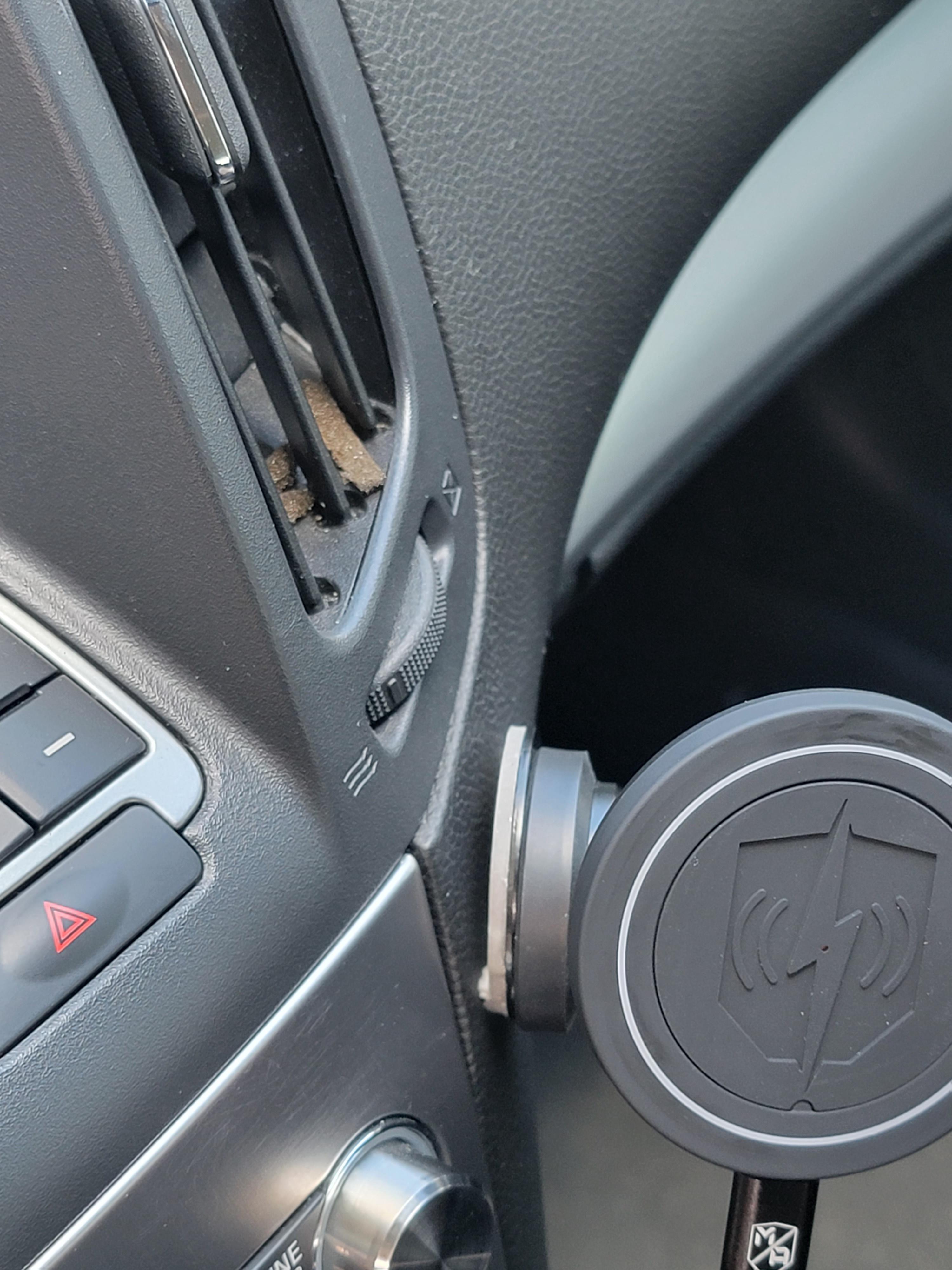
I contacted Mob Armor on September 6th at night and I'm writing this review at night on the 10th and they still haven't replied. That's 3 business days and a saturday and no response whatsoever from the company. There's another con. I wanted to know if they had any insight into what's going on with the mount or any suggestions. I wanted to see if they would work with me and give me another reason to like the company, or if I would have to just figure it out and/or return the product to Amazon.
Moving on, I decided on September 7th to add some superglue. I was in a hurry at the end of my break and just held the ahdesive away from the dash a bit and put some glue back there. I pressed it on and waited until the next day to use it. It's now been 3 days and it's working well now that I added superglue.
Images:
Spoiler
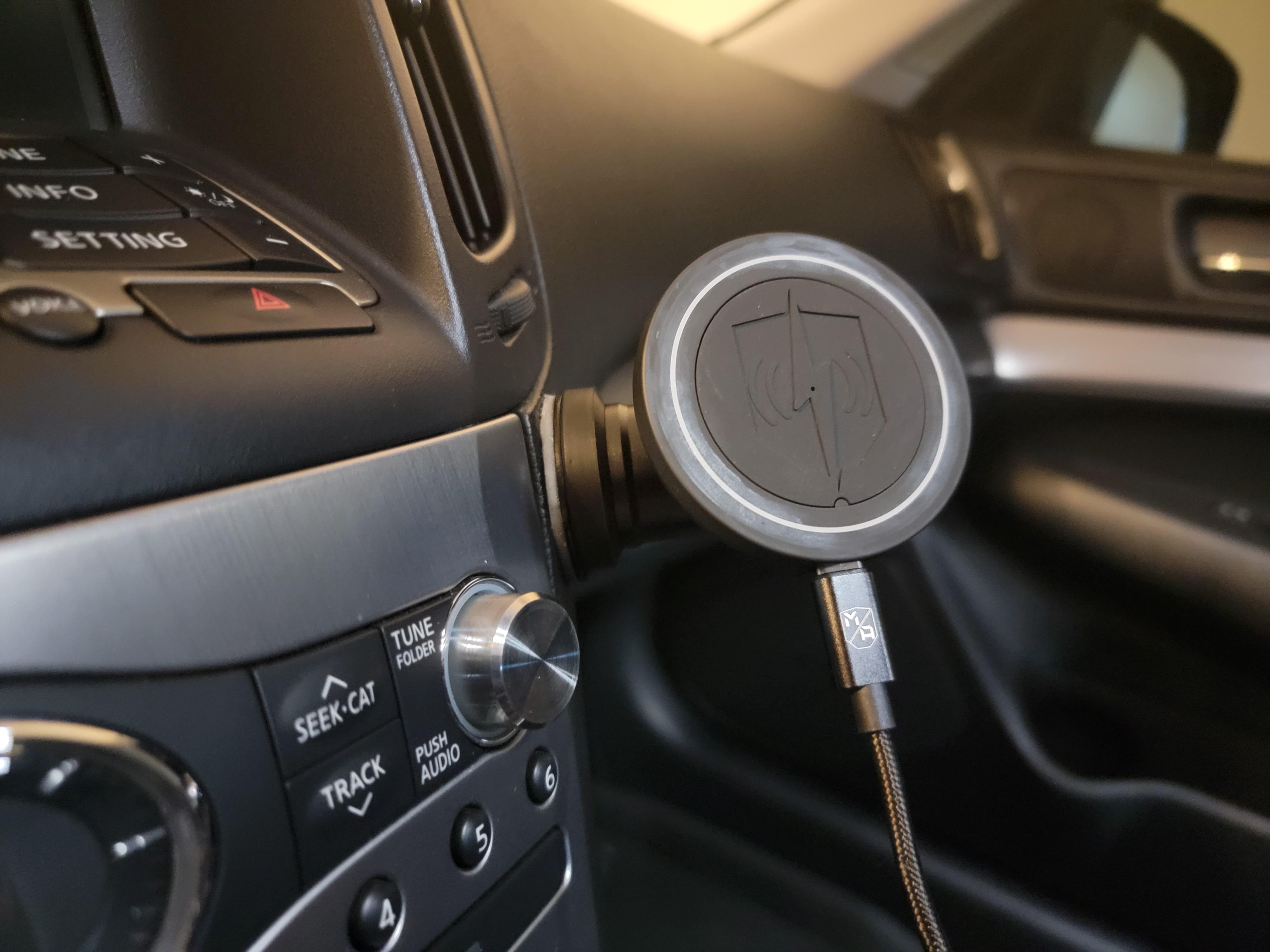
You can see the cable included looks nice, but depending on your application this is a pro or a con. For me, it's too long for my uses. I twist tied it and stuffed it next to the power adapter and it's not bad. If you really wanted to go all out you could buy a nice Type C USB cable which is much shorter. Maybe I'll do that one day.
Moving on to the Garmin DriveSmart 65, I was using a suction cup mount for this and it's not the greatest because when I take turns fast it moves around. It can also wobble some unless I make sure the Garmin is setting against the dash. I had the choice of having it almost close enough for my liking and wobbling more, or closer to the windshield and more stable. Finally, I just didn't like having a suction cup on the window because it made the dash and window harder to clean and it looked ugly, especially from the outside.
I ordered another MobNetic Maxx for my Garmin GPS. This adhesive-backed steel disc was even harder to position and attach because I had nothing to line it up with. I had to angel the mount at the joint area and press the Garmin unit against it, making sure that it's setting inside the circle in the back of the unit, and figure out where I want it. I had to check clearance for the cable, too. The problem I faced with this was it wasn't tall enough for the unit with a 6.5" screen to not have any bend in the cable. I decided that since I already had the cable sort-of bent before I was just going to bite the bullet and let it bend a little more. If it ends up no longer working I will replace it with a cable using a straight connector (this cable is hardwired into the BCM). Then I had to make sure I mark that spot with my finger (marking it with some kind of temporary marker would probably have helped) and clean the area as well as prep it, then put the mount there.
I allowed it to cure and attached the mount onto the steel disc. This was another challenge as I have to make sure it's mounted directionally correct, but the magnets are so strong that it's hard to get it close and angle it where I want it, then let it attach. It just sucks it onto the mount with serious force! So this is a bit of a con that it's a little of a pain to install, but it's worth it in my opinion. I also stuck another steel disc (each mount comes with 2, remember?) on the back of the Garmin in the circular cut-out.
The finished result doesn't look amazing in pictures but from the driver seat it actually is perfect. It's much more stable than any window suction cup I've used (I haven't used anything else for this unit).
Images:
Spoiler


One other nice thing about these is that the mounts attach to anything magnetic, like the car body. The strength and stability is obviously better if you stick it on one of their steel discs.
I'm overall satisfied with the Mob Armor products and would definitely reccomend if you're looking for a good mounting system for the G37 sedan which supports Qi charging and doesn't block the vents/controls as well as not being positioned somewhere a passenger can ruin it by kneeing it. This is especially for those people with heavy and/or large phones like the S21 Ultra.
Last edited by AnotherVQ; Sep 11, 2022 at 12:09 AM.



Joined: Oct 2011
Posts: 6,103
Likes: 592
From: People's Republic of IL
Is that the 7" garmin? View not obstructed with that placement?
I actually just sold my drivesmart 65. No suitable place to mount it in the stinger where it wouldn't be too obstructive. Using an older driveluxe 50 in the lower left corner.
I actually just sold my drivesmart 65. No suitable place to mount it in the stinger where it wouldn't be too obstructive. Using an older driveluxe 50 in the lower left corner.
Joined: Oct 2011
Posts: 6,103
Likes: 592
From: People's Republic of IL
I suppose your viewing angle is different. I'm 6'.
I did make my own custom mag mount for it - https://photos.app.goo.gl/UqNKu9fimwQUmMKR7 . Holds the 65 quite well. The magnet part was from arkon. I can't recall the part number. One side of it is 4 magnets, other side is the 17mm female socket to mount to 17mm ball.
There's a nifty hidden menu in those units. Long hold the speedometer button from the stats screen to bring it up. There's an option to enable bread crumbs recorded every second. Useful for tracking corner speeds. It's saved as a .gpx in the logs folder. Open in basecamp or mapsource to view.
I did make my own custom mag mount for it - https://photos.app.goo.gl/UqNKu9fimwQUmMKR7 . Holds the 65 quite well. The magnet part was from arkon. I can't recall the part number. One side of it is 4 magnets, other side is the 17mm female socket to mount to 17mm ball.
There's a nifty hidden menu in those units. Long hold the speedometer button from the stats screen to bring it up. There's an option to enable bread crumbs recorded every second. Useful for tracking corner speeds. It's saved as a .gpx in the logs folder. Open in basecamp or mapsource to view.
I suppose your viewing angle is different. I'm 6'.
I did make my own custom mag mount for it - https://photos.app.goo.gl/UqNKu9fimwQUmMKR7 . Holds the 65 quite well. The magnet part was from arkon. I can't recall the part number. One side of it is 4 magnets, other side is the 17mm female socket to mount to 17mm ball.
There's a nifty hidden menu in those units. Long hold the speedometer button from the stats screen to bring it up. There's an option to enable bread crumbs recorded every second. Useful for tracking corner speeds. It's saved as a .gpx in the logs folder. Open in basecamp or mapsource to view.
I did make my own custom mag mount for it - https://photos.app.goo.gl/UqNKu9fimwQUmMKR7 . Holds the 65 quite well. The magnet part was from arkon. I can't recall the part number. One side of it is 4 magnets, other side is the 17mm female socket to mount to 17mm ball.
There's a nifty hidden menu in those units. Long hold the speedometer button from the stats screen to bring it up. There's an option to enable bread crumbs recorded every second. Useful for tracking corner speeds. It's saved as a .gpx in the logs folder. Open in basecamp or mapsource to view.


Thread
Thread Starter
Forum
Replies
Last Post
JSolo
Audio, Video & Electronics
3
Jun 17, 2018 11:59 AM
mastapro
Audio, Video & Electronics
13
Mar 10, 2016 05:30 AM