


Linking my iphone to 2008 G37


Thread Starter
Registered User
Joined: May 2010
Posts: 13
Likes: 0
Linking my iphone to 2008 G37
I would like to link my iphone/ipod to my 2008 G37 so I can play my music through my car speakers through the auxilary feature. It should be relatively easy, but I can't figure it out. Anyone??? 

Thread Starter
Registered User
Joined: May 2010
Posts: 13
Likes: 0
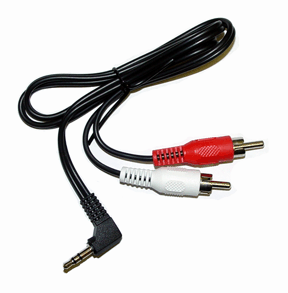
Thanks so much! I have bought so many different cables that I thought would work. That one looks good. Do you think Radio Shack would carry it? I am so glad I just found this forum. I've had my G37S Coupe since 2008 and I have wanted to do this for that long. LOL I knew I came to the right place.
Last edited by dooozie; May 29, 2010 at 11:34 PM. Reason: improve answer

what app are you trying to play the music from?
if you wanna play songs from the ipod app, you can use the cable that came with the car that plugs into the charger of the iphone
anything else you would need an audio cable like g37sam mentioned
if you wanna play songs from the ipod app, you can use the cable that came with the car that plugs into the charger of the iphone
anything else you would need an audio cable like g37sam mentioned

Registered User
Joined: Jan 2008
Posts: 1,213
Likes: 2
From: Saint Simons Island, GA
You just have to be aware that the original iPod cable on the 08-09 G doesn't charge the iPhone (or iTouch) like the old iPods....
Trending Topics

Registered Member
Joined: May 2010
Posts: 169
Likes: 0
From: Atlanta
I use this guy:
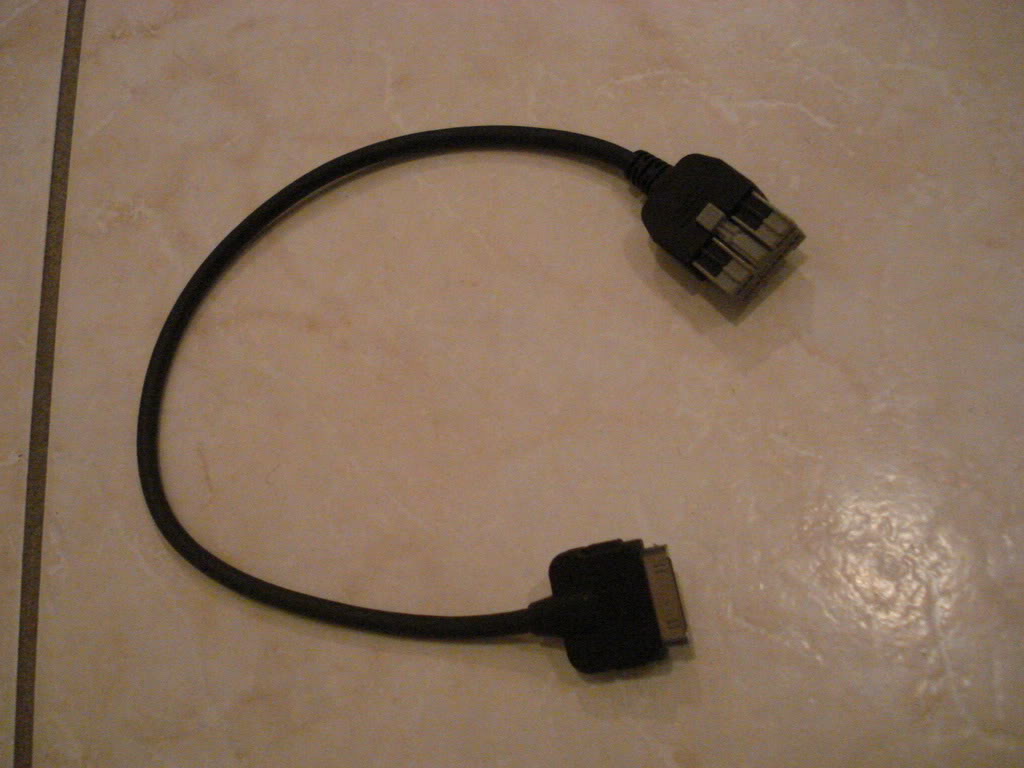
It works great - I just wish the car had a better interface to scroll through the artists/albums... takes way too long. They should put an index by alphabet on the side of the touchscreen like the Contacts page of an iPhone
It works great - I just wish the car had a better interface to scroll through the artists/albums... takes way too long. They should put an index by alphabet on the side of the touchscreen like the Contacts page of an iPhone
Registered User
Joined: Feb 2010
Posts: 797
Likes: 3
From: Maryland
Just for some reference btw, from what I've gathered there are certain models of ipods which support charging via firewire. This includes all of the ipod classics, *some* of the nanos, and none of the phones I think. Although the first generation iTouch does support firewire charging. Only the models that support firewire charging can be charged with the G connector.
iPod - Wikipedia, the free encyclopedia
In that link^^ there is a table column for "connection." If it says it accepts firewire, or "firewire for charging only" then it should charge with the 08-09 G iPod adapter. Otherwise, if it's USB only, it will work but won't charge.
Thread Starter
Registered User
Joined: May 2010
Posts: 13
Likes: 0
I purchased the cable recommended by G37SAM and it worked like a charm. I was happily listening to my music as I pulled out of the parking lot. I don't remember getting any kind of a cable when I purchased the car. I purchased my G37S with every option they offered. It is loaded, so I would think I should have received one. Oh well, the problem is solved for $8.00 and I am happy camper. Thanks to all and especially for the quick response from G37SAM. BTW, the gal at Radio Shack really appreciated the picture of the cable I needed. Thanks again, G37SAM.


Registered User
Joined: Dec 2009
Posts: 42
Likes: 0
From: Boston
If you want to use an alphabet type interface for iphone/ipod artists use the Genre option, on Itunes change the Genre from rock or rap or whatever it is on each song to the first letter of the artist and bam there you go!
Registered User
Joined: Feb 2010
Posts: 797
Likes: 3
From: Maryland
One caveat is when you do this you lose the pre-programmed genres, so if you use those then this is probably not a good option. I never browse by the real genres anyway so I didn't care.

Registered User
Joined: Sep 2018
Posts: 1
Likes: 0