


Best G37 Gauges! (Turbo, Engine, Speed, Temp)


Its a little more complicated. The dvd player once its engaged will play music through it and you can not play your music or listen to anything else other than the dvd player. You will also have to have the video play hack when you are moving, but then that disengages the navigation.


Let me shed some light on this situation. After many hours of research, I figured out that Infiniti and Nissan have switched to a new video interface called GVIF. GVIF stands for Gigabit Video InterFace.
This interface takes regular video signal (red, green, blue, hsyn, vsync) and combines it into a digital serial signal which transferred over 2 wires. This is what the factory service manual referred to as digital RGB. Once the LCD receives this signal, it has another chip to unscramble the signal back to rgb+sync.
Fortunately, this technology has been in use by Rangerover and Toyota for a number of years already. Thus, there are some products available to convert to this signal. The only one that would work for us is this:
GVIF Interface for Lexus/Toyota/Land Rover/Cadillac/Jaguar - Video Interfaces - Multimedia Interfaces - CarSolutions Online Shop
This allows you to add 3 composite video signals to the factory screen. The only problem is that they do not have a cable yet for Infiniti/Nissan. So you would need to cut the factory cable.
This interface takes regular video signal (red, green, blue, hsyn, vsync) and combines it into a digital serial signal which transferred over 2 wires. This is what the factory service manual referred to as digital RGB. Once the LCD receives this signal, it has another chip to unscramble the signal back to rgb+sync.
Fortunately, this technology has been in use by Rangerover and Toyota for a number of years already. Thus, there are some products available to convert to this signal. The only one that would work for us is this:
GVIF Interface for Lexus/Toyota/Land Rover/Cadillac/Jaguar - Video Interfaces - Multimedia Interfaces - CarSolutions Online Shop
This allows you to add 3 composite video signals to the factory screen. The only problem is that they do not have a cable yet for Infiniti/Nissan. So you would need to cut the factory cable.
Great research Modme. Thanks for doing this!
UPDATE EDIT: Well after talking with the company that makes the GVIF, they said the GVIF that is for the toyota/etc doesnt work very well on the infinitis 2010+ and that they are working on a new interface that should be out in September and will also include cables 2010+ Infiniti models.
Modme I hope your ok with the little hijack of your thread toward this 2010 interface issue. We can make another thread if you like to keep your clear of this?
UPDATE EDIT: Well after talking with the company that makes the GVIF, they said the GVIF that is for the toyota/etc doesnt work very well on the infinitis 2010+ and that they are working on a new interface that should be out in September and will also include cables 2010+ Infiniti models.
Modme I hope your ok with the little hijack of your thread toward this 2010 interface issue. We can make another thread if you like to keep your clear of this?
Last edited by Fezzik; Jul 1, 2011 at 09:03 AM.
Nah, this is good. My old system has been ripped out. I've upgraded my navigation system and screen to the 2010 version. That is why I am also very interested in the new system. I also contacted the website. The interface for NIssan/Infiniti is ready. The interface itself is the same as the Toyota/Range Rovers, we just need the cable for Nissan.
According to my contact, the box and cable is ready for purchasing. He agreed to give me a good group discount for 6+ units. I started a group bu here:
https://www.myg37.com/forums/audio-v...ml#post3174373
Please join in if youre interested.
According to my contact, the box and cable is ready for purchasing. He agreed to give me a good group discount for 6+ units. I started a group bu here:
https://www.myg37.com/forums/audio-v...ml#post3174373
Please join in if youre interested.

Nah, this is good. My old system has been ripped out. I've upgraded my navigation system and screen to the 2010 version. That is why I am also very interested in the new system. I also contacted the website. The interface for NIssan/Infiniti is ready. The interface itself is the same as the Toyota/Range Rovers, we just need the cable for Nissan.
According to my contact, the box and cable is ready for purchasing. He agreed to give me a good group discount for 6+ units. I started a group bu here:
https://www.myg37.com/forums/audio-v...ml#post3174373
Please join in if youre interested.
According to my contact, the box and cable is ready for purchasing. He agreed to give me a good group discount for 6+ units. I started a group bu here:
https://www.myg37.com/forums/audio-v...ml#post3174373
Please join in if youre interested.


Nah, this is good. My old system has been ripped out. I've upgraded my navigation system and screen to the 2010 version. That is why I am also very interested in the new system. I also contacted the website. The interface for NIssan/Infiniti is ready. The interface itself is the same as the Toyota/Range Rovers, we just need the cable for Nissan.
According to my contact, the box and cable is ready for purchasing. He agreed to give me a good group discount for 6+ units. I started a group bu here:
Group Buy 2010 Navigation Screen Interface - MyG37
Please join in if youre interested.
According to my contact, the box and cable is ready for purchasing. He agreed to give me a good group discount for 6+ units. I started a group bu here:
Group Buy 2010 Navigation Screen Interface - MyG37
Please join in if youre interested.

Registered User
Joined: May 2014
Posts: 1
Likes: 0
Please tell FFC p/n, 4PDT Relay, and 2010 Screen Option
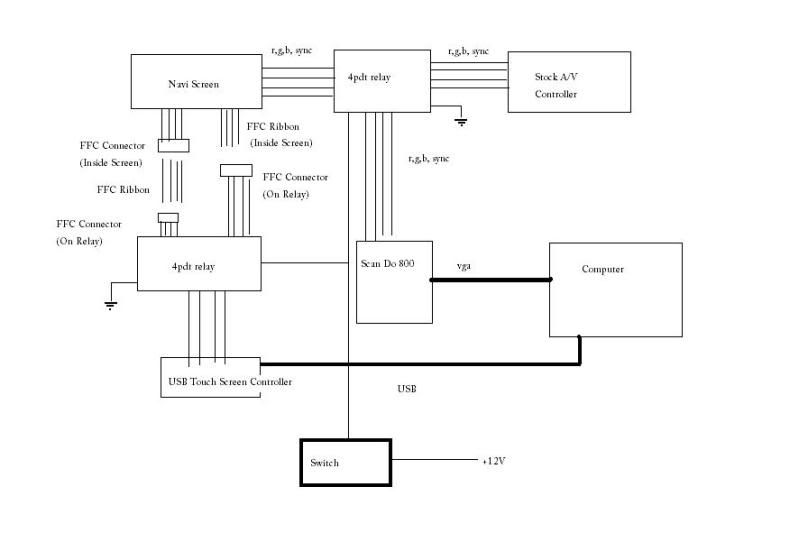
Sorry to resurrect a long dead thread, but this is the most appropriate topic heading.
First of all congratulations on pioneering the Scan Do solution. The 15kHz discovery was certainly a crucial break thru. I have just purchased a non-working Scan Do 1024 on eBay and am in the process of getting a working one. I have also purchased some latching and non latching relays as well as a discreet flush mount activation switch and an Arduino Pro-Mini. My plan is to implement the schematic above but also to add an option to mute the audio when the GPS is talking, and of course the 'ol parking brake/VSS trickeroo all controlled by the Arduino interpreting button pushes. So I have some very specific questions, and I would appreciate if you could answer BEFORE I pull my dash apart, as I would like to do this only one time.
1) Can you please confirm that the USB Touch Screen Controller is SLT-TP05-USB?
2) Can you please provide the FFC Connector part number for 2008 G37 Touch Screen FFC?
(In other words, when you pull the stock FFC Touchscreen ribbon cable out of the display, what do you plug it into?)
3) Can you please provide the corresponding FFC Ribbon Cable Part number?
4) What are the native resolutions of the 2008 and 2010 screens?
5) How did your 2010 Screen upgrade work out? Would you recommend it over 2008?
6) I presume that if you already have 2008 Nav, then to upgrade to 2010 Nav you have to swap the screen unit, the AV Unit, and the connector wiring correct? Any other major components?
7) Where do you get the pigtails for 2010, and what are the part numbers?
8) I am using latching relays so that they "remember" and also so that I don't leave a relay coil powered all the time. What 4pdt relay part number did you use?
I will take pics as I build this, and report back to this Forum...if anyone is interested. Here is my preliminary design plan. Any comments or would you do anything differently?
=================== Design Notes ====================
Activate Reverse Camera while travelling forward (Latched)
Reverse Wire: Straight thru (Normal) or
+12V (Active)
Activate Aux Video Input While Driving (Latched)
Parking Brake Wire: NC (Normal) or
Ground (Active)
VSS Wire: Straight thru (Normal) or
Open (Active)
Activate VGA Video while Driving (Latched)
Parking Brake Wire: NC (Normal) or
Ground (Active)
VSS Wire: Straight thru (Normal) or
Open (Active)
RGB + Sync Straight thru (Normal) or
9-Pin RGB (Active)
Mute Audio when Garmin Speaks (Not Latched)
Amplifier ON signal Straight thru (Normal) or
Ground (Active)
Center Speaker Signal Straight thru (Normal) or
Garmin as the speaker driver (Active)
Close OK switch contacts (Not Latched)
Latched Contacts
====================
SPDT Reverse
DPDT Parking Brake
Speed Signal
4PDT RGB + Sync
4PDT Touch Screen to USB
Non Latched Contacts
============================
SPDT Amplifier ON Signal
SPDT OK Switch Contacts
DPDT Middle Speaker
TMPS
==============================
Switch Mom-Off-On
SPDT TPMS Diag (To Ground)
12V to 5V Power Supply
RGB Input Jack (Female DB15 or Female DB15 Cable)
Touch Screen Output Connector?
GPS Future:
Garmin Video LVDS to VGA to Scan Do to RGB

Thread
Thread Starter
Forum
Replies
Last Post
b2autodesigns
Brakes/Suspension
128
Mar 24, 2018 07:44 PM
KZK
Canada
0
Aug 13, 2015 06:17 AM
nethole
Engine, Drivetrain & Forced-Induction
4
Aug 12, 2015 04:08 PM
