


Everything you need to know about iPod Video Cables


Everything you need to know about iPod Video Cables
Since the question regarding which cable will allow their iPod to play videos on the nav screen seems to come up every week, I’ve decided to do start a new thread with (hopefully) all of the answers to your questions regarding each type of cable and which iPods are compatible with them.
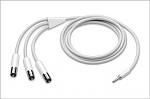
Apple iPod AV Cable
This cable is only compatible with the iPod with Color Display and the iPod with Video. It plugs into the headphone jack to pull the video feed from your iPod and on to your nav screen. You can use a cheaper third party cable as a substitute as long as the connections are the same.
http://store.apple.com/1-800-MY-APPL...&nplm=M9765G/B
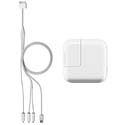
Apple Composite AV Cable
This cable is compatible with all of the newer generation iPods such as the 3rd Generation iPod Nano (fat one), iPod Classic, iPod Touch, and the iPhone, as well as the older models such as the iPod with Color Display and iPod with Video. This cable plugs into the dock connector at the bottom of the iPod to play the videos on your nav screen. At the time, you cannot use a third party substitute for this cable since Apple has incorporated a chip somewhere in the cable that will allow the iPods to play videos on an external screen.
http://store.apple.com/1-800-MY-APPL...nplm=MB129LL/A
Unlike the OEM Infiniti iPod cable that comes with the Premium Package, it will not charge the iPod while videos (or music) are playing unless you hook up a USB car charger to the USB port on the Apple Composite AV Cable. However, I'd advise you to use this charger with extreme caution since the reviews on the page have said that this plug (as well as the Griffin) would make the unit extremely hot and generate smoke, while possibly having the risk of starting a fire.
http://store.apple.com/1-800-MY-APPL...nplm=TN787LL/A
Troubleshooting:
Problem: Video is in Black & White and you have a newer model iPod
Solution: You are using the AV Cable when you need the Composite Cable
Problem: The sound is playing but the video doesn’t show at all
Solution: Turn on the E-Brake and put the navigation system into the correct AUX mode
More information about the new cables:
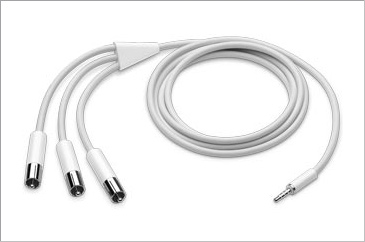
Apple iPod AV Cable
This cable is only compatible with the iPod with Color Display and the iPod with Video. It plugs into the headphone jack to pull the video feed from your iPod and on to your nav screen. You can use a cheaper third party cable as a substitute as long as the connections are the same.
http://store.apple.com/1-800-MY-APPL...&nplm=M9765G/B
Apple Composite AV Cable
This cable is compatible with all of the newer generation iPods such as the 3rd Generation iPod Nano (fat one), iPod Classic, iPod Touch, and the iPhone, as well as the older models such as the iPod with Color Display and iPod with Video. This cable plugs into the dock connector at the bottom of the iPod to play the videos on your nav screen. At the time, you cannot use a third party substitute for this cable since Apple has incorporated a chip somewhere in the cable that will allow the iPods to play videos on an external screen.
http://store.apple.com/1-800-MY-APPL...nplm=MB129LL/A
Unlike the OEM Infiniti iPod cable that comes with the Premium Package, it will not charge the iPod while videos (or music) are playing unless you hook up a USB car charger to the USB port on the Apple Composite AV Cable. However, I'd advise you to use this charger with extreme caution since the reviews on the page have said that this plug (as well as the Griffin) would make the unit extremely hot and generate smoke, while possibly having the risk of starting a fire.
http://store.apple.com/1-800-MY-APPL...nplm=TN787LL/A
Troubleshooting:
Problem: Video is in Black & White and you have a newer model iPod
Solution: You are using the AV Cable when you need the Composite Cable
Problem: The sound is playing but the video doesn’t show at all
Solution: Turn on the E-Brake and put the navigation system into the correct AUX mode
More information about the new cables:
Here is a full, in-depth explanation of the old and new methods for video output:
http://www.appleinsider.com/articles...th_review.html
http://www.appleinsider.com/articles...th_review.html




Trending Topics

Registered User
Joined: Apr 2007
Posts: 44
Likes: 0
From: Orlando, FL / Corona Del Mar, CA
For the 4G (iPod photo, iPod w/Color Screen) and 5G (iPod Video) models, you can use a commonly-available camcorder video cable. The left cable is correct, but you have to swap the right cable and the video cable for it to work correctly. See the attached pics where I use a Radio Shack camcorder cable to output video from my 5G iPod to the car. Note the cable order in the pic without the RCA plugs in use and look at the order with them plugged in to see how to attach the plugs to get the audio and video to play correctly.
Last edited by RPF; Jan 30, 2008 at 04:30 AM.


Premier Member
Joined: Jul 2007
Posts: 3,346
Likes: 3
From: Colorado Springs, CO
If you are parked, then you can plug in an AV source (IPod with adapter or dvd player) to the RCA connection you have in the center armrest console. Then just change the input on your stereo to AUX and you can watch a movie.

Premier Member
Joined: Jul 2007
Posts: 3,346
Likes: 3
From: Colorado Springs, CO
I am not sure if it does. I wouldn't image that it does due to the heat produced would be by the IPod. Maybe the cable makes the IPod work more which I highly doubt. I think the problem might be with people leaving the IPod in the center console/armrest were the heat builds due to having no ventilation. That makes more sense to me.