


NTB12-070/ITB12-054 reprogramming disc



Joined: Oct 2011
Posts: 6,103
Likes: 594
From: People's Republic of IL

Thread Starter
Registered Member
Joined: Jul 2021
Posts: 11
Likes: 2
disc with
X1E72002/X2EC2001/X3E52005
https://drive.google.com/drive/folde...lhahxKK-L3iOlq
and X3E82004
https://drive.google.com/file/d/1_g1...ew?usp=sharing
X1E72002/X2EC2001/X3E52005
https://drive.google.com/drive/folde...lhahxKK-L3iOlq
and X3E82004
https://drive.google.com/file/d/1_g1...ew?usp=sharing

Banned
Joined: Sep 2022
Posts: 14
Likes: 0
Hi everyone,
So glad I found this forum. I'm looking for the same DVD to improve Bluetooth functionality. I have an iPhone 13 and while Bluetooth "works", every once in a while the song name won't show up and audio controls on steering wheel won't respond. Sometimes, though, it works perfectly fine.
However, I have an M37X with Navigation. My current FLASH Ware version (according to the secret System Diagnostic Menu) is X1UA0001 and my Bluetooth Firmware is E0420.
Does anyone if @Cosmouaz 's versions would work in my M37X? I know I don't have a G, but this forum is much more active than the M forums. Nearest dealership to me wants $270 for the update... Thanks in advance for any guidance.
So glad I found this forum. I'm looking for the same DVD to improve Bluetooth functionality. I have an iPhone 13 and while Bluetooth "works", every once in a while the song name won't show up and audio controls on steering wheel won't respond. Sometimes, though, it works perfectly fine.
However, I have an M37X with Navigation. My current FLASH Ware version (according to the secret System Diagnostic Menu) is X1UA0001 and my Bluetooth Firmware is E0420.
Does anyone if @Cosmouaz 's versions would work in my M37X? I know I don't have a G, but this forum is much more active than the M forums. Nearest dealership to me wants $270 for the update... Thanks in advance for any guidance.
Banned
Joined: Sep 2022
Posts: 14
Likes: 0
@JSolo , thanks for the link to that Mega download link. I downloaded that ISO and started looking through many of the files. Looks like there's a X1U folder inside the ZZPROG folder. I also opened many of the files with a Hex Editor. Some of the files reference a Bluetooth Firmware number of E0450. My current Bluetooth Firmware is E0420.
Trending Topics

Moderador


Joined: Jun 2019
Posts: 2,626
Likes: 765
From: South Florida
@JSolo , thanks for the link to that Mega download link. I downloaded that ISO and started looking through many of the files. Looks like there's a X1U folder inside the ZZPROG folder. I also opened many of the files with a Hex Editor. Some of the files reference a Bluetooth Firmware number of E0450. My current Bluetooth Firmware is E0420.
There was a time where I paired the my Galaxy S22 as an Audio device first then as a phone device second and it seemed to connect really fast without interruptions however I havent been able to get it back to that.
I have noticed that the car fights my Airpods for priority to keep that in mind. You might go through this whole thing and not get any changes.
Joined: Oct 2011
Posts: 6,103
Likes: 594
From: People's Republic of IL
@M37bluetooth The question is, will the car reject the update if it doesn't match its system identifiers, or blindly allow the flash to proceed. I certainly hope its the former if incompatible.
I think part of the problem is BT backward incompatibility between the different versions. Case and point; My wireless keyboard is a microsoft BT model from 2004 (yes, still works!). This keyboard originally came with a BT dongle and a BT mouse. The dongle (BT 2.0?) is unique in that it provides a HID profile outside of windows (can access bios).
My current system has an intel ax200 wifi card which supports BT 5.2. While the keyboard will pair with the ax200, it does so only in windows, most of the time. That is, sometimes the pairing gets broken and I have no keyboard. This happens often enough to be a nuisance. PC has no less than 15 usb type a ports (2.0, 3.0, 3.0gen2, usb c gen 2). I can spare one port for the original dongle.
Since doing so about 8 months ago I haven't had a single broken connection with the keyboard. My point, the car is from 2012 using 2010 (?) tech for the infotainment system. It could very well be an incompatibility similar to above between the phone/car. Does the phone allow you to manually set a bt version?
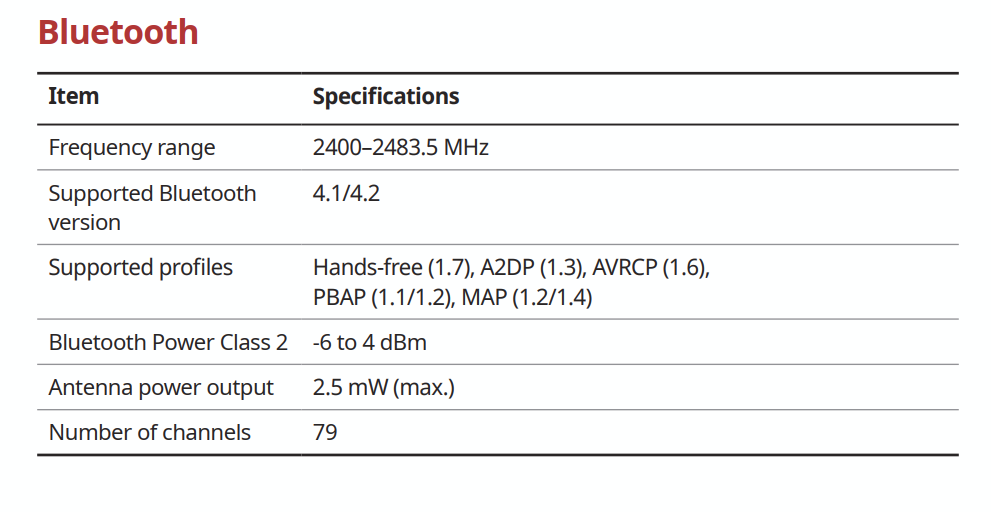
Edit; my '22 stinger supports bt 4.1/4.2 according to the infotainment manual. I couldn't find a similar spec in the g37 owners/nav manuals.

I think part of the problem is BT backward incompatibility between the different versions. Case and point; My wireless keyboard is a microsoft BT model from 2004 (yes, still works!). This keyboard originally came with a BT dongle and a BT mouse. The dongle (BT 2.0?) is unique in that it provides a HID profile outside of windows (can access bios).
My current system has an intel ax200 wifi card which supports BT 5.2. While the keyboard will pair with the ax200, it does so only in windows, most of the time. That is, sometimes the pairing gets broken and I have no keyboard. This happens often enough to be a nuisance. PC has no less than 15 usb type a ports (2.0, 3.0, 3.0gen2, usb c gen 2). I can spare one port for the original dongle.
Since doing so about 8 months ago I haven't had a single broken connection with the keyboard. My point, the car is from 2012 using 2010 (?) tech for the infotainment system. It could very well be an incompatibility similar to above between the phone/car. Does the phone allow you to manually set a bt version?
Edit; my '22 stinger supports bt 4.1/4.2 according to the infotainment manual. I couldn't find a similar spec in the g37 owners/nav manuals.
Last edited by JSolo; Sep 22, 2022 at 01:51 PM.
Banned
Joined: Sep 2022
Posts: 14
Likes: 0
I hope I dont rain on your parade however I did the disc update and still have BT connectivity issues.
There was a time where I paired the my Galaxy S22 as an Audio device first then as a phone device second and it seemed to connect really fast without interruptions however I havent been able to get it back to that.
I have noticed that the car fights my Airpods for priority to keep that in mind. You might go through this whole thing and not get any changes.
There was a time where I paired the my Galaxy S22 as an Audio device first then as a phone device second and it seemed to connect really fast without interruptions however I havent been able to get it back to that.
I have noticed that the car fights my Airpods for priority to keep that in mind. You might go through this whole thing and not get any changes.
I don't have AirPods, so I don't think I'll have that problem. What were your BT connectivity issues? Which car, M or G?
@M37bluetooth The question is, will the car reject the update if it doesn't match its system identifiers, or blindly allow the flash to proceed. I certainly hope its the former if incompatible.
So if I burn this ISO to a DVD and put it in, it should automatically select the appropriate version for the M37's system. I'll try this tonight, but I won't do the update as I don't know if I trust the source (do we know where this ISO came from?)
Joined: Oct 2011
Posts: 6,103
Likes: 594
From: People's Republic of IL
Re trusting source. The image I posted came from someone on here some years back. I used it in my own car to update the headunit fw. My issue was unit would reboot while routing a lengthy route (500mi +) and playing mp3's. It fixed that problem. Of course, you don't know me personally. I could just be some domesticated creature on the other end of the virtual line. ymmv.
Good luck!
So should the ax200, but between it and the keyboard, I end up with a disconnected keyboard periodically.
Good luck!
iPhone doesn't, unfortunately. But I believe it does "downgrade" the Bluetooth protocol to whatever the connecting device uses.
Moderador
Joined: Jun 2019
Posts: 2,626
Likes: 765
From: South Florida
The phone tends to prioritize calling vs audio. I would get in the car, it looks for the phone, it would connect however it wouldnt play music. I would press play on 3 different generations of Galaxy phones (S8, S10, S22) and it would play then pause.
The only way I could get it to work would be by disconnecting from the phone, exiting "bluetooth audio option" then re-pairing with starting with the phone first and then looking for the "bluetooth audio option to appear"
When I pair the phone as an audio device only I dont have these issues. What I do get is a fight of BT dominance if I have another active BT device somewhere close (airpods/OBD scanner)
The Update ended up just updating more things on the Navi side than BT side.
Banned
Joined: Sep 2022
Posts: 14
Likes: 0
Re trusting source. The image I posted came from someone on here some years back. I used it in my own car to update the headunit fw. My issue was unit would reboot while routing a lengthy route (500mi +) and playing mp3's. It fixed that problem. Of course, you don't know me personally. I could just be some domesticated creature on the other end of the virtual line. ymmv.
I put the disc in and this is what it looks like:

Doesn't look like X1UC2007 is on the label of the purple DVD in the service bulltein

I have a few issues (2010 G37s Navi)
The phone tends to prioritize calling vs audio. I would get in the car, it looks for the phone, it would connect however it wouldnt play music. I would press play on 3 different generations of Galaxy phones (S8, S10, S22) and it would play then pause.
The only way I could get it to work would be by disconnecting from the phone, exiting "bluetooth audio option" then re-pairing with starting with the phone first and then looking for the "bluetooth audio option to appear"
The phone tends to prioritize calling vs audio. I would get in the car, it looks for the phone, it would connect however it wouldnt play music. I would press play on 3 different generations of Galaxy phones (S8, S10, S22) and it would play then pause.
The only way I could get it to work would be by disconnecting from the phone, exiting "bluetooth audio option" then re-pairing with starting with the phone first and then looking for the "bluetooth audio option to appear"
1) Before getting out of your car, switch to FM/AM or Satellite radio. Do not leave it on Bluetooth Audio.
2) Before getting in, open whatever music app you use and play a song and keep it playing.
3) After turning on the car, wait for the "Connected to XXXXXX phone"
4) When you see signal strength in the upper right corner, switch to Bluetooth Audio. Hopefully, it will ONLY connect to Bluetooth streaming when you switch to Bluetooth Audio menu.
Banned
Joined: Sep 2022
Posts: 14
Likes: 0
@M37bluetooth The question is, will the car reject the update if it doesn't match its system identifiers, or blindly allow the flash to proceed. I certainly hope its the former if incompatible.
So, using your ISO that you put on Mega (with all the different versions inside the ZZPROG folder), the system shows the prompt I screenshotted above, with the new version number (X1UC2007) that will be installed.
However, using the two ISOs that @Cosmouaz posted, I see this instead:
So the answer is YES, the system is "smart enough" to reject updates that it doesn't understand. My other question, though, remains unanswered... X1UC2007 from the Mega ISO file or X1UC2003 from the legit disc at a dealership?
 Anyone know if there's a difference?
Joined: Oct 2011
Posts: 6,103
Likes: 594
From: People's Republic of IL
There in lies the age old question. What update to apply when documentation is scarce? The header is the same on both X1UC. 2007 is higher than 2003.
Look at the dates from the xxxx2003 disc. Most of the files inside of the iso i posted are from 01/2017.
Looking back through my history, I got the disk back in 01/2018. I must of updated the car shortly after. Seems like so long ago now.
MD5 of the ISO: ec90e80ba03eb3afdc9ea83aa30c77c7
I hate updating stuff. Aside from the issue I recently had with my pc, it was built in q3 2019. At that time I installed the current bios and windows. Since then no updates period! Other than the hardware problem related to a faulty reset switch (which caused all hell to break lose in terms of stability), the system's been rock solid. And now with the new switches installed, going on 9 days of uptime (usually 30-90 days between reboot).
Do you feel lucky??? Well do you?,......
Look at the dates from the xxxx2003 disc. Most of the files inside of the iso i posted are from 01/2017.
Looking back through my history, I got the disk back in 01/2018. I must of updated the car shortly after. Seems like so long ago now.
MD5 of the ISO: ec90e80ba03eb3afdc9ea83aa30c77c7
I hate updating stuff. Aside from the issue I recently had with my pc, it was built in q3 2019. At that time I installed the current bios and windows. Since then no updates period! Other than the hardware problem related to a faulty reset switch (which caused all hell to break lose in terms of stability), the system's been rock solid. And now with the new switches installed, going on 9 days of uptime (usually 30-90 days between reboot).
Do you feel lucky??? Well do you?,......